The Ultimate PDF to Speech Guide That Makes Your Documents Talk
Abstract: In today's information-saturated world, we're constantly bombarded with PDF documents—academic papers, work reports, e-books, product manuals... Prolonged screen reading not only strains our eyes but also limits our ability to make use of fragmented time. Wouldn't it be wonderful if these PDF documents could "speak" like audiobooks? This article will take you deep into PDF to speech technology and introduce you to a powerful free tool—Luvvoice—teaching you how to effortlessly convert any PDF into natural, fluent audio.
Introduction: Have You Ever Been Trapped by "Reading"?
Imagine these scenarios:
Students: Finals are approaching, dozens of lengthy English research papers (in PDF format) are piling up like mountains. Your eyes are dry and sore, and your study efficiency is plummeting.
Working Professionals: During your daily subway commute, you want to use this time to read an important industry analysis report (PDF), but staring at your phone's small screen in a swaying, crowded train car is pure torture.
Content Creators: You want to turn your carefully crafted in-depth articles (PDF drafts) into audio versions for podcast platforms, but you lack professional equipment and a broadcaster's voice.
Visually Impaired or Elderly Individuals: You want to access information in PDF files, but visual barriers create an insurmountable gap between you and knowledge.
If these scenarios resonate with you, then "PDF to Speech" technology is exactly the breakthrough solution you need. It's not just a technological innovation—it's a new, more efficient, and more inclusive way of consuming information. It can transform cold text into warm voices, completely freeing your eyes and allowing you to "hear" knowledge anytime, anywhere.
What is PDF to Speech? How Does It Work?
Technically speaking, PDF to speech is a specific application of Text-to-Speech (TTS) technology. Its implementation typically involves two core steps:
Text Extraction
First, the tool needs to intelligently "grab" all text content from the PDF file. This step is crucial because PDF format is complex and may contain various elements like text, images, and tables. An excellent tool must be able to accurately identify and extract readable text.
Speech Synthesis
After extracting the text, the TTS engine steps in, using advanced AI and deep learning algorithms to convert these text characters into speech that sounds like real human pronunciation. The naturalness, fluency, and emotional expressiveness of the voice are key measures of TTS technology quality.
In the past, voices synthesized by such tools were often stiff and mechanical, full of "robot flavor." But today, with the advancement of AI technology, we can achieve voice effects that rival real humans. Among these many tools, Luvvoice is undoubtedly one of the best.
How to Choose an Excellent PDF to Speech Tool?
When selecting a tool, we should focus on several aspects:
- Voice Quality: Is the voice natural, clear, and free from mechanical feel?
- Language and Voice Selection: Does it support multiple languages and different voice styles (male, female, young, old)?
- Ease of Operation: Is the upload and conversion process simple and intuitive?
- Customization Features: Can you adjust parameters like speech rate and pitch?
- Cost: Does it provide free yet powerful services?
Fortunately, we no longer need to search extensively. Luvvoice, as a comprehensive and powerful free online TTS platform, perfectly meets all the above criteria and provides a dedicated "File to Speech" feature that makes PDF to speech conversion unprecedentedly simple.
Luvvoice: Your Ultimate One-Stop PDF to Speech Solution
Luvvoice is not just a simple tool with a text box and a play button—it's a professional-grade AI voice generator built on deep learning and AI research achievements. Let's see how to use Luvvoice and why it's the best choice for PDF to speech tasks.
Step 1: Easy Upload, One-Click Start
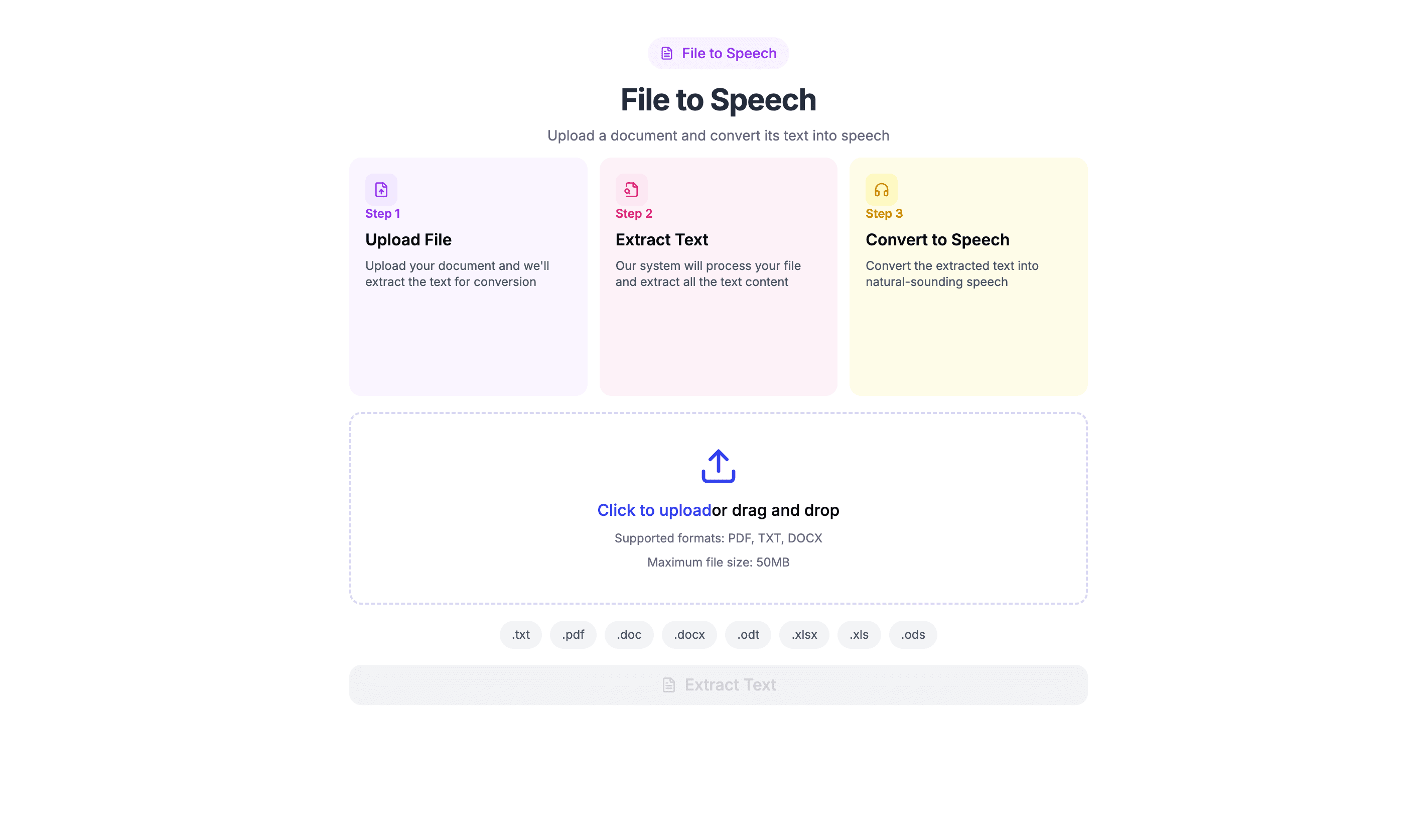
Luvvoice's "File to Speech" feature is specifically designed for document processing. You don't need to manually copy and paste large chunks of text from PDFs—the entire process takes just three steps:
-
Upload File: Visit the Luvvoice website, click the "File to Speech" tab, and directly upload your PDF file (it also supports common formats like TXT).
-
Automatic Text Extraction: Luvvoice's backend system immediately begins processing your file, using its powerful parsing engine to accurately extract all text content. The entire process is fully automated—you just need to wait a moment.
-
Select and Generate: After text extraction, you can enter the exciting voice selection phase!
Step 2: Say Goodbye to Stiff Robot Voices, Embrace Realistic AI Human Voices
This is Luvvoice's most stunning feature. It completely overturns people's stereotypical impressions of synthesized speech.
Vast Language and Voice Library: Luvvoice offers over 200 AI voices covering more than 70 languages worldwide. Whether your PDF is in English, Chinese, Spanish, Japanese, or French, you can find the most authentic pronunciation. Moreover, each language offers multiple voice options—for example, Jenny's gentle female voice or steady male voices. You can match them according to your document's nature (such as using steady voices for academic reports or lively voices for story novels).
Human-like Naturalness: Luvvoice's voices are built on breakthrough AI research, capable of mimicking real human intonation, pauses, and emotions, sounding extremely natural and fluent. This is crucial for long-term listening, as it won't cause fatigue or distraction.
Step 3: Highly Customizable, Create Your Personal Listening Experience
Luvvoice gives users tremendous control. Before generating speech, you can click the settings button to easily adjust Speech Rate and Pitch.
- Want to quickly browse report content? Speed up the speech rate.
- Learning a new language and want to hear each word's pronunciation clearly? Slow down the speech rate.
- Want the voice to sound more authoritative or more lively? Adjust the pitch accordingly.
This personalized setting makes the audio completely serve your specific needs.
Step 4: Efficient Processing, Supporting Long Documents
For users who need to process lengthy reports or entire e-books, character limits are a common pain point. Luvvoice performs very generously in this regard. Free users can enjoy quite long character quotas, while logged-in users and paid users can convert up to 20,000 characters at once—equivalent to several chapters of a novel. This greatly improves the efficiency of processing large documents and avoids the hassle of frequently splitting text.
Step 5: Free to Use, Download Anytime
After completing all settings, click the "Generate" button, and Luvvoice will create a high-quality MP3 audio file for you. You can listen online directly or download it for free to your local device, saving it on your phone, computer, or MP3 player for listening anytime, anywhere.
Innovative Applications of Luvvoice in Different Scenarios
Education and Learning
Convert boring PDF textbooks and literature into audio, listen repeatedly during commutes, workouts, or household chores, using your "ears" to deepen memory and understanding. For language learners, this is excellent material for listening practice and pronunciation imitation.
Content Creation
YouTubers and TikTok creators can use Luvvoice to add high-quality narration to videos without recording themselves. Podcast hosts can quickly convert written scripts into audio programs, enriching their content formats.
Marketing and Business
Create audio versions of product introductions and training materials for convenient learning by employees and customers.
Accessibility
Luvvoice becomes a bridge connecting visually impaired users with digital information. Website developers or nonprofit organizations can use it to easily create accessible audio versions of PDF content. As one user said: "The quality of AI-generated speech is impressive. It's very helpful for creating accessible content for visually impaired users on my website."
Common Questions and Considerations
Why can't my PDF file extract text?
Luvvoice can handle most standard PDF files. However, if your PDF is a collection of scanned images or is essentially one large image without embedded text layers, the system may not successfully extract text. This is a technical challenge faced by all similar tools currently. Before use, please ensure your PDF is text-based.
Can I add pauses to the audio?
Yes. In the text editor, you can guide natural pauses by inserting punctuation marks (like commas and periods). For longer pauses, you can manually insert prompts like "(pause 2 seconds)" where needed, or process them later with simple audio editing software.
Conclusion: Start Your "Listening" Reading Journey Now
PDF to speech technology is profoundly changing how we consume information. It's not just a tool for improving efficiency—it's a lifestyle that makes knowledge acquisition more convenient and humanized.
Among the many tools available, Luvvoice stands out as the undisputed first choice with its extremely natural AI voices, rich language and voice selections, powerful file processing capabilities, user-friendly interface, and completely free entry threshold. It simplifies the complex conversion process to just a few clicks, allowing everyone to easily awaken the text sleeping in PDFs and transform it into vivid sounds flowing in their ears.
Don't let tired eyes become a barrier to acquiring knowledge anymore. Visit the Luvvoice website now, upload your first PDF file, and personally experience the magic of making documents "speak"! Your ears will thank you.